Xero Promo Code: 80% Off for 6 Months (US, No Code Needed)
How to get 80% off Xero for six months in the US, what you will actually pay on each plan, and when the deal is not right for you.

So, you want Xero, but you’d rather not pay full price while you find out whether it suits you. Fair enough.
Here’s the good news: you don’t need a promo code. New US customers can get 80% off for six months by signing up through a Xero referral link like ours. The discount applies itself at sign-up.
Below, I’ll show you exactly what you’ll pay on each plan, how to claim it in a few minutes, and when it’s not the right deal for you.
Quick answer
- Best ongoing deal: 80% off any Xero plan for your first 6 months via a partner link. No code. Valid for organisations new to Xero until 31 March 2027.
- Until 2 November 2026 only: Xero’s own US offer is 90% off for 6 months with code DC90626310US on xero.com. It ends at 11:59pm UTC that day.
- You can’t stack them. Xero says its offer can’t be combined with any other offer, so pick one.
- After 6 months you pay the regular price ($27, $59 or $97 a month) unless you cancel.
Partner offer · checked 1 Nov 2026
80% off Xero for 6 months
For organisations new to Xero on the Early, Growing and Established plans, until 31 March 2027. No code needed: the discount is applied when you sign up through the link.
Signing up before 2 November 2026?
Xero’s own US promotion is slightly better until then: 90% off the base plan for 6 months with code DC90626310US, for US customers buying their first organisation on xero.com. It ends at 11:59pm UTC on 2 November 2026. From 3 November, the 80% partner link above is the best available deal.
How Much You’ll Pay With the Xero Discount (US)
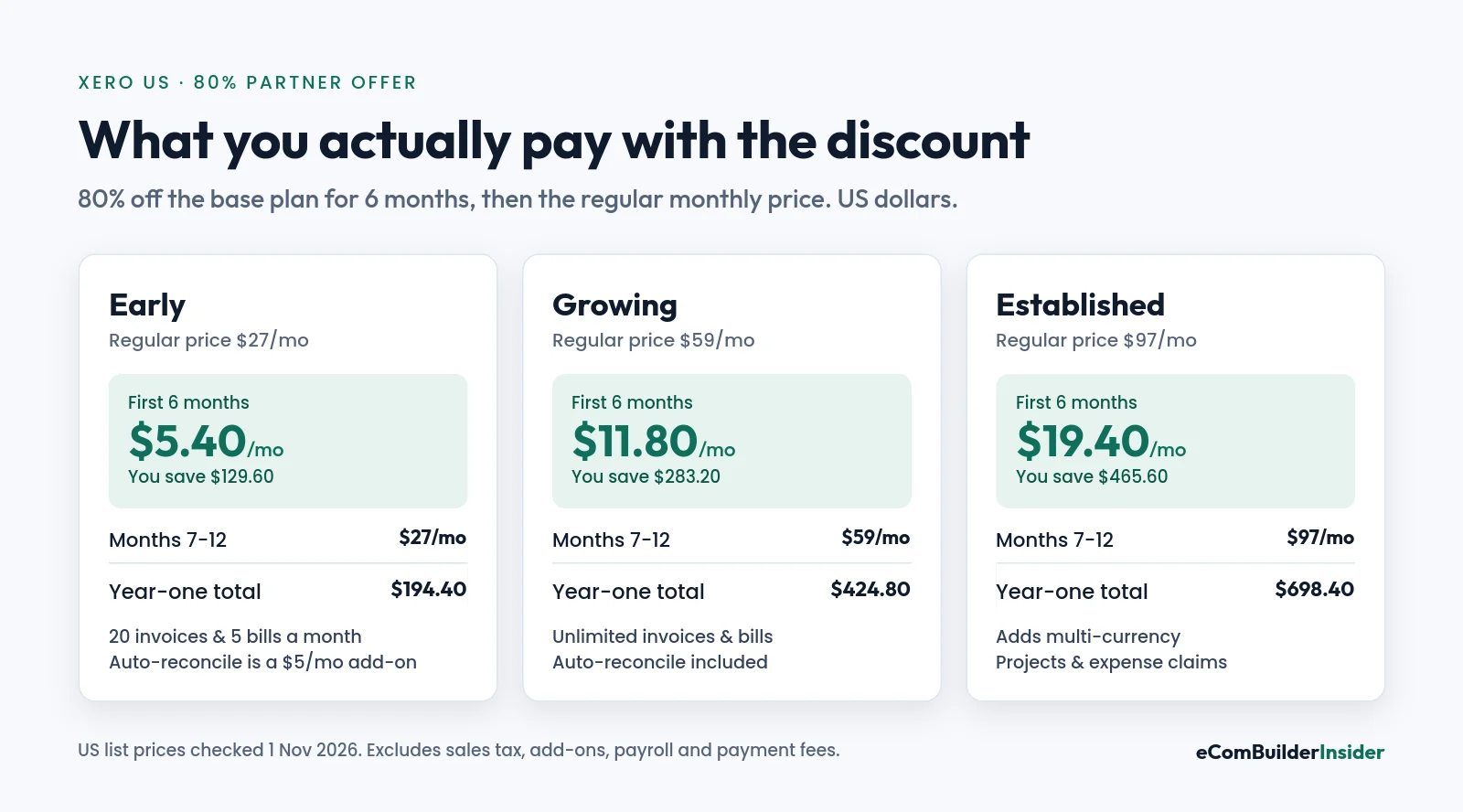
Discounts are easy to misread, so here are the real numbers. The 80% comes off the base plan for six months; after that, you pay the regular US price.
| Plan | Regular price | First 6 months | You save | Year-one total |
|---|---|---|---|---|
| Early | $27/mo | $5.40/mo | $129.60 | $194.40 |
| Growing | $59/mo | $11.80/mo | $283.20 | $424.80 |
| Established | $97/mo | $19.40/mo | $465.60 | $698.40 |
Drawn from the table above. Lowest price highlighted.
With Xero’s own 90% offer (until 2 November 2026), the first six months would be $2.70, $5.90 or $9.70 a month, and the year-one totals $178.20, $389.40 and $640.20.
The discount only covers the base subscription. Add-ons such as payroll, Inventory Plus and payment processing fees are charged at their normal price.
Which Xero Plan Should You Pick?
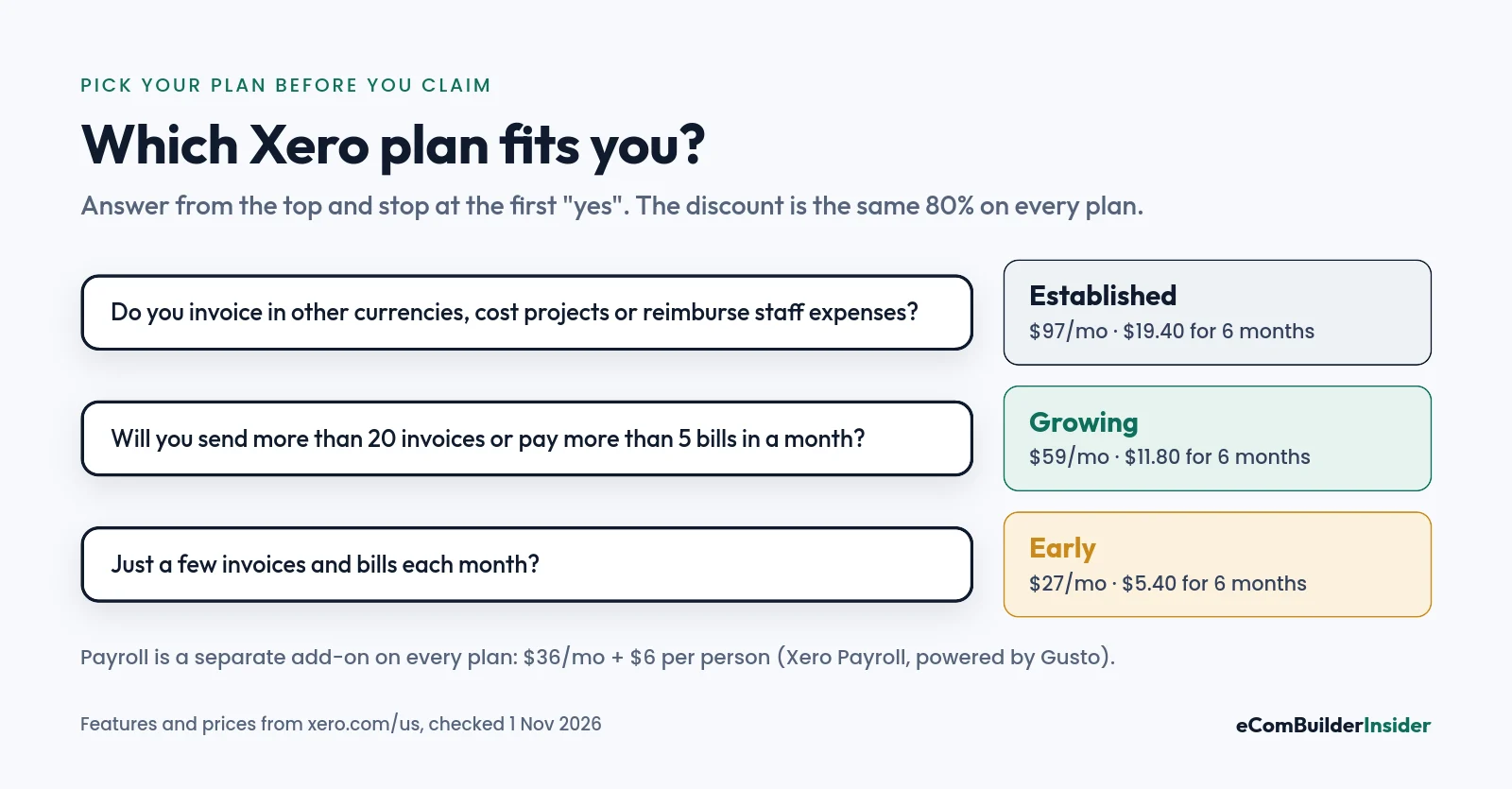
This matters more than the discount. Pick a plan that’s too small and you’ll hit its limits in the first month; pick one that’s too big and you’ll pay for features you never touch once the six months are up.
| Early | Growing | Established | |
|---|---|---|---|
| Invoices and quotes | 20 invoices a month | No limit stated | No limit stated |
| Bills | 5 a month | No limit stated | No limit stated |
| Auto-reconcile | $5/mo add-on | Included | Included |
| Multi-currency | No | No | Yes |
| Projects and expense claims | No | No | Yes |
| Cash flow forecast | 30 days | 60 days | 180 days |
Early suits a freelancer or side business with a handful of invoices. Growing is where most small businesses land. Established only makes sense if you need multi-currency, project costing or staff expense claims.
Need payroll? Xero Payroll (powered by Gusto) is an add-on at $36 a month plus $6 per employee or contractor, on any plan, and it isn’t discounted. Our Xero pricing guide breaks down every plan in detail.
How to Claim the 80% Xero Discount
It takes about five minutes, and there’s nothing to copy and paste.
- Open the partner link. Use our Xero partner link. It takes you to Xero’s sign-up page with the 80% offer attached.
- Create your account. Enter your name, email and business details, and set a password.
- Verify your email. Click the link Xero sends to your inbox.
- Choose your plan. Pick Early, Growing or Established. The discounted price should show before you pay.
- Add your payment details. The discount runs for your first six months, then the regular monthly price applies.

If the discounted price doesn’t appear before you pay, stop there: the partner offer may have changed. Check this page again or contact Xero before you subscribe.

Who Can Use the Xero Promo?
- New organisations only. If your business already has a Xero subscription, the offer won’t apply to it.
- One offer at a time. Xero says its promotion can’t be combined with any other offer.
- Base plan only. Add-ons, usage charges and payment fees are billed at full price.
- Outside the US? Plans, prices and offers differ by country. Use the country guides further down.
When This Xero Deal Isn’t Right for You
A big discount is only a good deal if Xero is the right software. Honestly, I’d skip it if:
- You want payroll built in. Xero’s payroll is a separate add-on, so a platform with built-in payroll might work out simpler.
- Your accountant works in QuickBooks. Having them in the same software can save you more than six months of discount.
- You need lots of users with strict permissions and haven’t tested how Xero handles your team.
- You can’t afford the regular price. Six cheap months are no use if $59 a month will hurt in month seven.
Free tool · 4 quick steps
Not sure Xero is the one? Try my free Accounting Software Finder
Pick your country, business type and must-have features. You get a ranked shortlist with a score out of 100 and a plain-English reason for every match.
What You Get With Xero
Every plan includes the core bookkeeping: bank feeds and reconciliation, invoices and quotes, bill tracking, receipt capture (Xero calls it Smart Document Capture), financial reports and a mobile app. There are no per-user licence fees, and you can invite your accountant or bookkeeper.
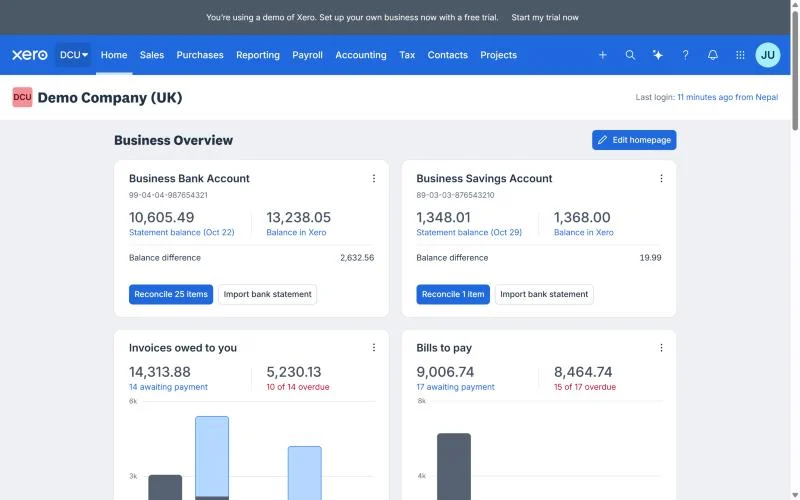
Xero also connects with popular apps through the Xero App Store, including Stripe, PayPal and Shopify, which is handy if you sell online. For the full picture, read my Xero review.
Xero vs QuickBooks: Promo Prices Compared
QuickBooks is the obvious alternative, so here’s how the first-year cost compares on similar entry plans. These aren’t like-for-like feature sets, so treat it as a price check, not a verdict.
| Xero | QuickBooks Online | |
|---|---|---|
| Current US promo | 80% off for 6 months (partner link) | 50% off for 3 months |
| Entry plan | Early: $27/mo | Simple Start: $38/mo |
| Entry plan, year one | $194.40 | $399.00 |
| Mid plan | Growing: $59/mo | Essentials: $85/mo |
| Mid plan, year one | $424.80 | $892.50 |
| Users | No per-user licence fees | 1 user (Simple Start), 3 (Essentials) |
If you’re torn between the two, my Xero vs QuickBooks comparison goes through invoicing, bank feeds, reporting and payroll side by side.
Xero Discounts in Other Countries
Xero runs similar offers elsewhere, but the plans, prices and tax rules differ. If you’re not in the US, use your country’s guide:
- Xero promo code UK: plans in pounds, Making Tax Digital and VAT
- Xero promo code Australia: plans in AUD, GST, BAS and Single Touch Payroll
- Xero promo code New Zealand: plans in NZD and GST returns
- Xero free trial explained: what to test before you pay
Frequently Asked Questions
Is there a Xero promo code?
For the 80% partner offer, no: the discount comes with the link, so there’s nothing to enter. Xero’s own US promotion uses the code DC90626310US, but it ends at 11:59pm UTC on 2 November 2026.
Can I combine the Xero discount with another offer?
No. Xero states its promotion can’t be used with any other offer, so choose the one that saves you most on the day you sign up.
Does the discount work on every Xero plan?
Yes. The 80% partner offer covers the Early, Growing and Established plans. It doesn’t cover add-ons such as payroll.
What happens after the six months?
Your subscription continues at the regular monthly price ($27, $59 or $97) until you cancel. Xero subscriptions are monthly, so you can cancel rather than renew.
Can I get the discount if I already use Xero?
Not on an existing subscription. The offers are for organisations new to Xero.
Is the discount better than the free trial?
It depends on how sure you are. A trial lets you test without paying; the discount saves you up to $465.60 over six months on Established. If you already know you want Xero, I’d sign up through the link from the start rather than hoping to add a discount later.
Can my accountant access my Xero account?
Yes. You can invite your accountant or bookkeeper, and Xero doesn’t charge per-user licence fees.
Ready to Try Xero for Less?
If Xero fits how you work, six months at $5.40 to $19.40 a month is about as cheap as testing it gets. You can connect your bank, move your books across and see whether it suits you, without a big commitment.
Partner offer · checked 1 Nov 2026
80% off Xero for 6 months
New organisations, all three plans, no code needed. Valid until 31 March 2027.
Still comparing? Start with the best accounting software for small business, or browse everything in the Xero Resource Center.