
How to Do a Bank Reconciliation (Step by Step, with Example)
6
minute read
16
sections
October 16, 2026
last updated
Ahmed Raza
reviewed by
So, someone told you to “reconcile your bank account every month”, and you nodded, and you haven’t done it. It sounds like the kind of thing only accountants enjoy.
Here’s the truth: a bank reconciliation is just checking that your books and your bank statement agree, and explaining any difference. With accounting software and a bank feed, it’s 20 minutes a month.
I’m an accountant, and reconciliation is the step I’d never let a client skip. Below is exactly how to do it, with a worked example, plus how it looks in Xero and QuickBooks.
General information, not tax advice
I’m an accountant, but I don’t know your situation. Check anything tax-related with your own accountant or your tax authority (the IRS in the US, HMRC in the UK, the ATO in Australia).
Why reconciling matters
- It catches missing money. A customer payment you never recorded, or a refund you forgot.
- It catches double-counting. The same expense entered twice, or imported twice.
- It catches things nobody entered. Bank fees, interest, and card charges.
- It spots fraud early. A payment you don’t recognise shows up in days, not at year-end.
If your books aren’t reconciled, every report built on them is a guess.
What you need before you start
- Your bank statement for the month (or the bank feed in your software).
- Your books for the same account and period.
- Last month’s reconciled closing balance.
- Any receipts or invoices for transactions you don’t recognise.
Step 1: Pick the account and the period
Reconcile one account at a time: your main bank account first, then savings, then credit cards.
Use the statement’s exact end date, for example 31 March. Don’t reconcile to “today”.
Step 2: Check the opening balance
Your opening balance this month should equal last month’s reconciled closing balance, and the bank’s opening balance.
If it doesn’t, something from a previous month has changed. Fix that first, or you’ll chase the wrong difference.
Step 3: Match money in
Go through each deposit on the statement and tick it off against a sale, customer payment or other income in your books.
In software with a bank feed, this is mostly accepting suggested matches. Just check each match is the right invoice.
Step 4: Match money out
Do the same for every payment: supplier bills, expenses, wages, transfers and card payments.
Watch for transfers between your own accounts. They should be recorded as transfers, not as expenses.
Step 5: Deal with anything that does not match
You’ll usually be left with a few items. Each one falls into one of these groups:
| What you find | What it usually is | What to do |
|---|---|---|
| On the statement, not in your books | Bank fee, interest, a payment you forgot to record | Record it in your books |
| In your books, not on the statement | A timing difference: a deposit or payment that has not cleared yet | Leave it; it should clear next month |
| Different amounts | A typo, or a fee taken off a payment | Correct the entry, or record the fee separately |
| On the statement twice, or in your books twice | A duplicate | Delete or void the duplicate in your books |
Step 6: Prove the two balances agree
Now adjust both sides and check they meet. Here’s a worked example for 31 March:
| Bank side | Amount |
|---|---|
| Balance per bank statement | $8,450 |
| Add: customer payment recorded 31 March, cleared 1 April | + $1,200 |
| Less: supplier payment sent, not cleared yet | − $650 |
| Adjusted bank balance | $9,000 |
| Books side | Amount |
|---|---|
| Balance per your books (before fixes) | $9,012 |
| Less: monthly bank fee not yet recorded | − $15 |
| Add: interest earned not yet recorded | + $3 |
| Adjusted book balance | $9,000 |
Both sides land on $9,000, so the account is reconciled. Record the $15 fee and $3 interest in your books, and the $1,200 and $650 will clear on next month’s statement.
Step 7: Save the reconciliation report
Most software produces a reconciliation report. Save it with your month-end records. It’s your proof the account was checked, and your accountant will ask for it.
Reconciling a credit card
A credit card works the same way, just in reverse: the balance is money you owe.
- Use the card statement’s closing date and closing balance.
- Match every purchase to an expense in your books, and every payment to the matching transfer from your bank account.
- Record card fees and interest the card company charged.
- Check the balance you owe in your books matches the statement.
The most common problem: paying the card from your bank and recording that payment as an expense. It’s a transfer. The expenses are the purchases on the card.
Catching up after months of not reconciling
If you’re months behind, don’t panic, and don’t try to do it all in one sitting.
- Start with the oldest unreconciled month and work forwards, one month at a time.
- Get the opening balance right first. Everything else depends on it.
- Fix each month completely before moving on, and save each month’s reconciliation report.
- If the opening balance is badly wrong, or it’s been more than a year, ask a bookkeeper. It’s often cheaper than the hours you’d spend.
How it looks in Xero
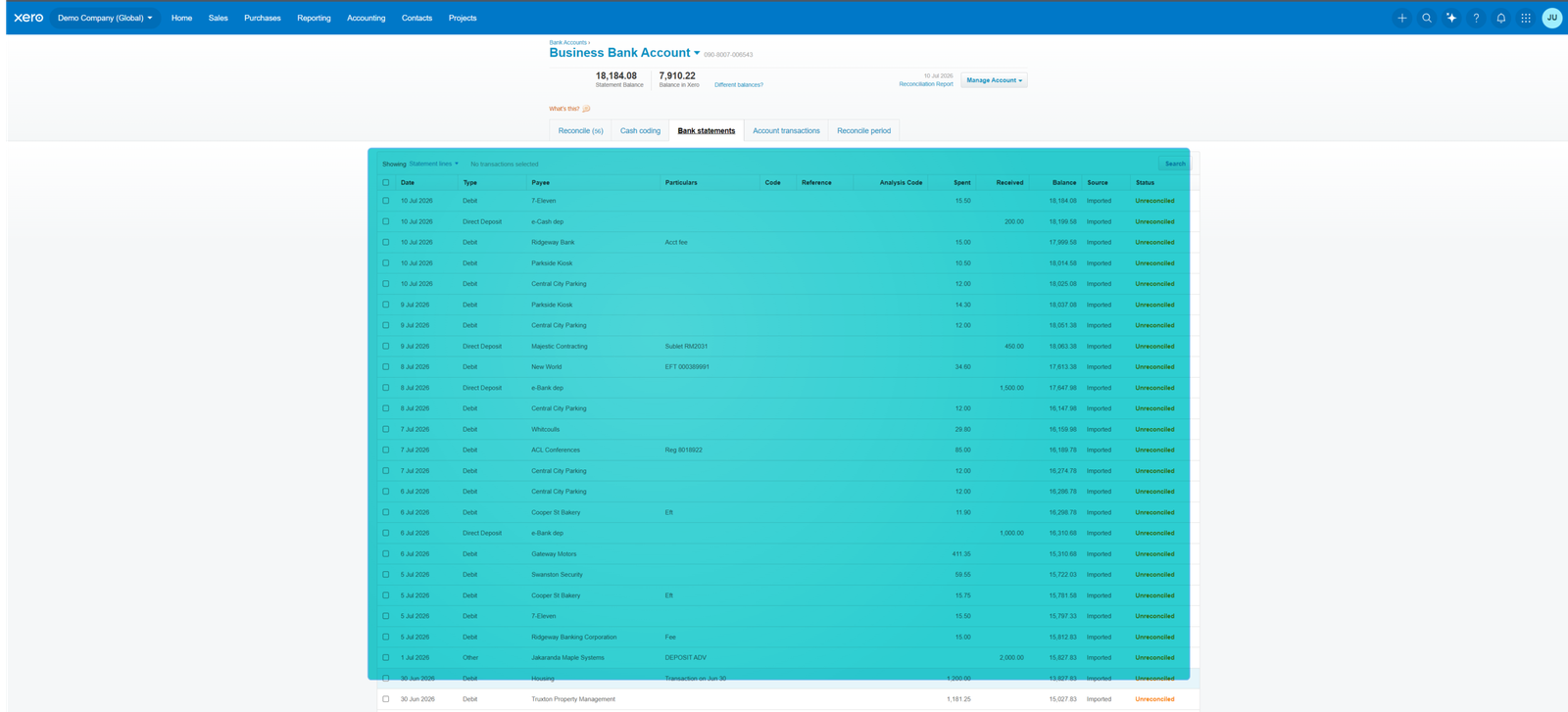
In Xero, reconciliation happens continuously. Transactions arrive through the bank feed, Xero suggests a match for each one, and you click OK or find the right match.
At month-end, compare Xero’s balance for the account with your bank statement balance on the same date. The bank reconciliation summary report shows any difference and the unreconciled items behind it.
More on Xero in my Xero review.
How it looks in QuickBooks Online
QuickBooks has a dedicated Reconcile screen. You choose the account, enter the statement’s ending date and ending balance, then tick off each transaction that appears on the statement.
When the difference shows zero, you finish the reconciliation and QuickBooks saves a report. If it won’t reach zero, work through Step 5 above.
More on QuickBooks in my QuickBooks review.
Common mistakes
Forcing it to balance
Never type an “adjustment” just to make the difference disappear. Find the cause; otherwise the error is still in your books.
Accepting every suggested match
Software matches are usually right, but not always. A $500 payment matched to the wrong $500 invoice leaves one customer looking overdue.
Reconciling to the wrong date
Use the statement end date, not today, or new transactions will throw the balances out.
Changing reconciled months
Editing a transaction in a month you’ve already reconciled breaks that reconciliation. If you must, re-reconcile the month and tell your accountant.
Forgetting credit cards and payment apps
Credit cards, PayPal and Stripe balances need reconciling too. That’s often where the missing transactions are.
Frequently asked questions
How often should I reconcile?
At least monthly, for every bank and card account. Busy businesses with a bank feed often match transactions weekly and do the formal check at month-end.
How long does a bank reconciliation take?
With software and a bank feed, often 15–30 minutes per account per month. Longer the first time, or if it’s been left for months.
What if I can’t find the difference?
Check the opening balance first, then look for a transaction of exactly the difference, or exactly half of it (a debit entered as a credit). If you’re still stuck, ask your accountant rather than forcing it.
Do I need to reconcile if I use a bank feed?
Yes. A bank feed brings transactions in, but it doesn’t confirm they’re categorised correctly or that nothing is missing or duplicated.
What to do next
Make it a habit: put a recurring 30-minute “reconcile” slot in your calendar for the first week of each month. For the bigger picture, go back to the full small business bookkeeping guide.
